Introduction
Welcome to the GuestWisely Google Travel Integration Guide!
We're excited to help you increase your property's visibility by connecting GuestWisely with Google Travel, allowing travellers to discover your properties directly through Google Search and Google Maps.
Google Travel is a metasearch platform that displays accommodation options and redirects potential guests to your direct booking website to complete their reservations.
With this integration, GuestWisely synchronises your property information, rates and availability with Google Travel, helping you attract direct bookings while keeping your property management centralised in GuestWisely.
One of the main advantages of this integration is that Google Travel does not charge booking commissions. Guests book directly through your website, and you retain control over the booking process.
Let's get started!
Before You Start
Before connecting, ensure each property:
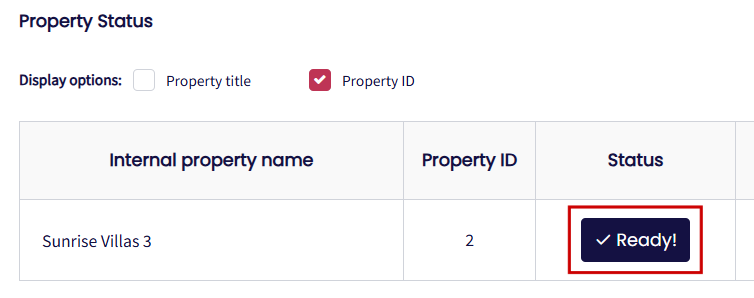
All property information is complete and accurate, with the status marked as Ready under Property Status.
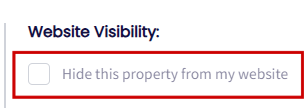
The "Hide this property from my website" option is unticked under Rates Settings. Properties with Website Visibility disabled will not be published to Google Travel.
Important: Google does not accept all property categories. Hotel and Shared Room property types are not supported by this integration.
Google Travel Onboarding Process
No separate Google account is required to initiate the connection through GuestWisely.
To start the integration:
Go to Google Travel Panel under Channel Manager in your GuestWisely account.
Move the properties you wish to connect from the left to the right-hand list.
Click the Sync Properties button to complete the process.
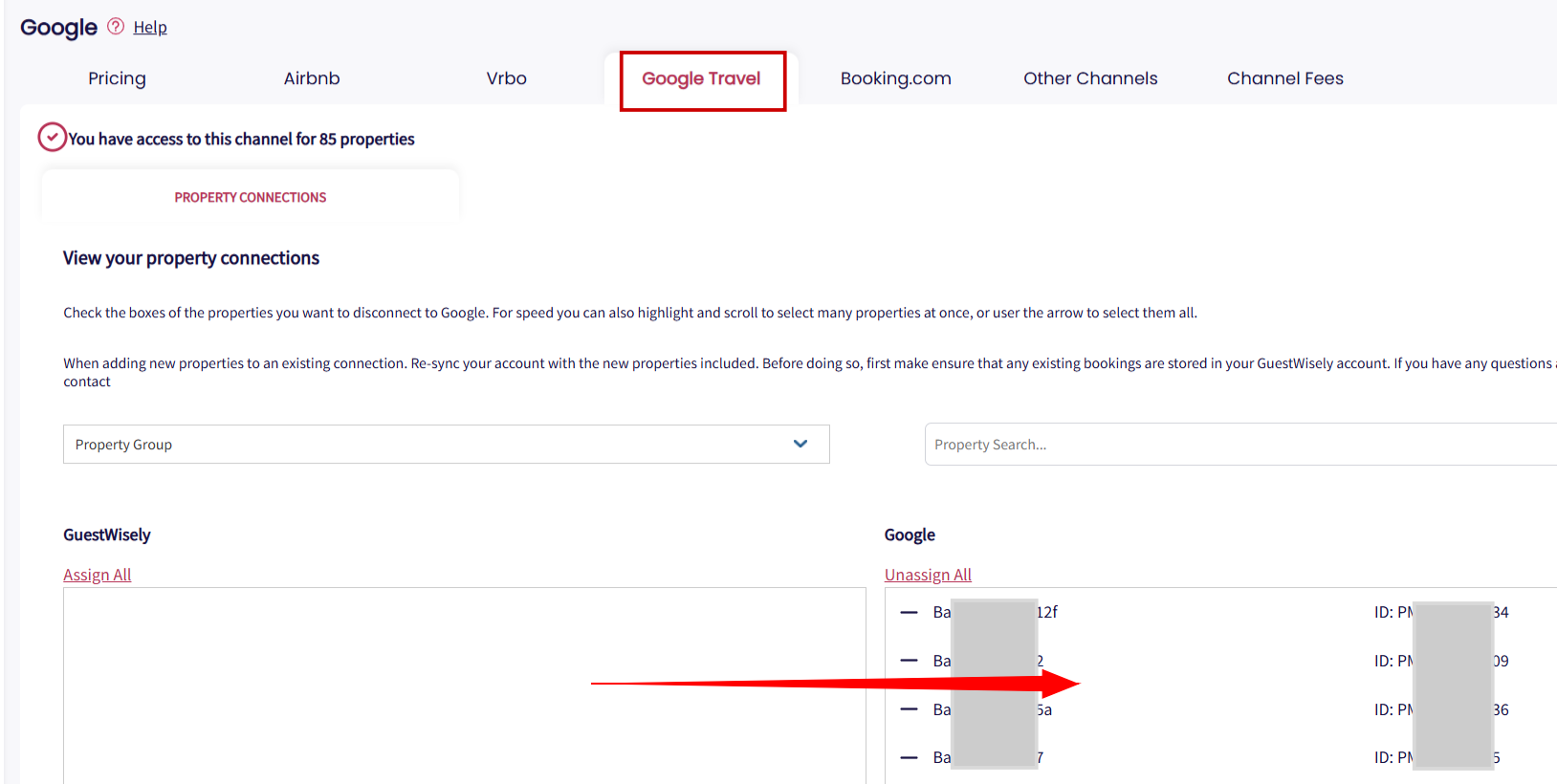
Once the connection has been established, GuestWisely will start transmitting the relevant property information, rates and availability to Google Travel.
Please note that Google controls the final approval and publication of listings. Google runs automated validation checks on content quality (photos, addresses, taxes, amenities, cancellation policy and matching booking URLs). Connecting a property does not guarantee that it will immediately appear on Google Travel. The initial sync with the channel might take up to 7 working days.
You can check the Property Status to monitor whether each property has been successfully connected to Google Travel.
Property Synchronisation
Your property information is managed directly within GuestWisely.
GuestWisely synchronises the information required by Google Travel, including:
Property information and descriptions
Photos
Rates
Availability
Rates and availability are synchronised frequently to help ensure that guests see up-to-date information when searching on Google.
Whenever you update property descriptions, photos or other listing information, GuestWisely will send the updated content to Google Travel. Static property information may take longer to update.
We recommend regularly reviewing your property information to ensure that your Google Travel listings remain accurate and attractive to potential guests.
How Google Travel Bookings Work
Unlike traditional booking channels, Google Travel does not process reservations directly. Instead, it helps guests discover your properties and redirects them to your direct booking website to complete their reservations.
Step 1: Access Your Booking Website via Google
Guests can discover your property through one of the following Google platforms:
Google Travel: Search for your property → Click View Details → Click Website / Visit Site.
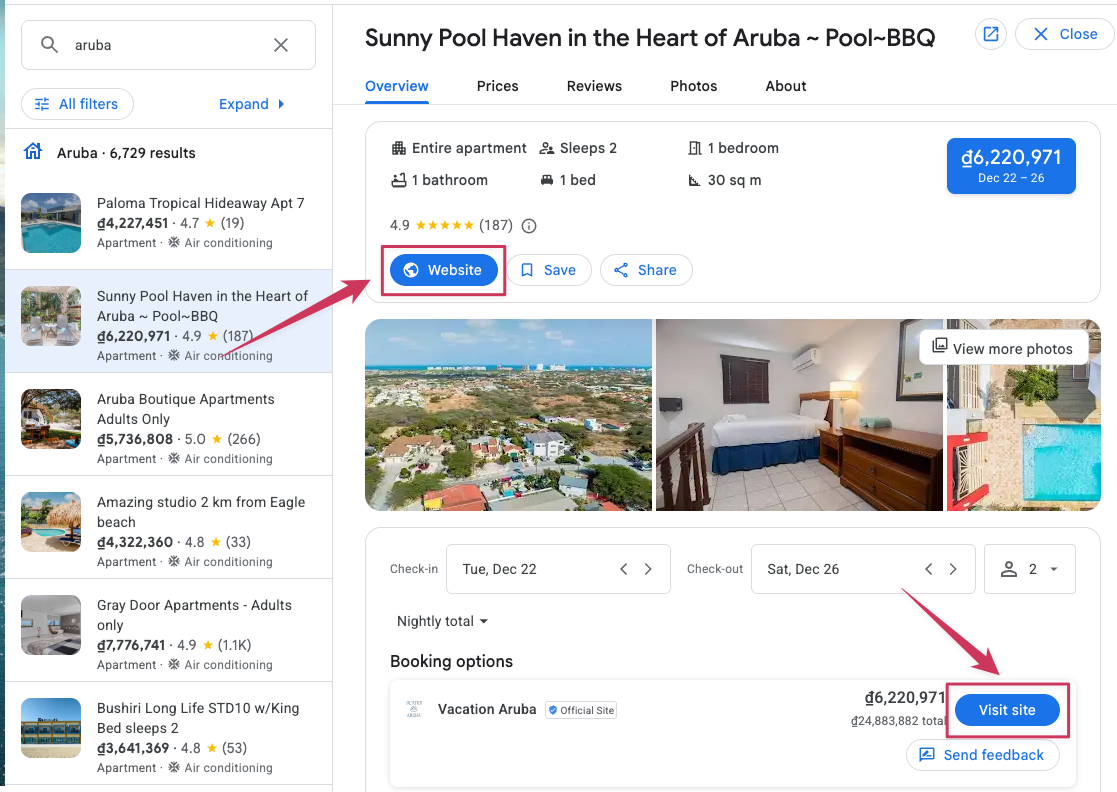
Google Maps: Search for your property → Open the property details → Click Website (if available).
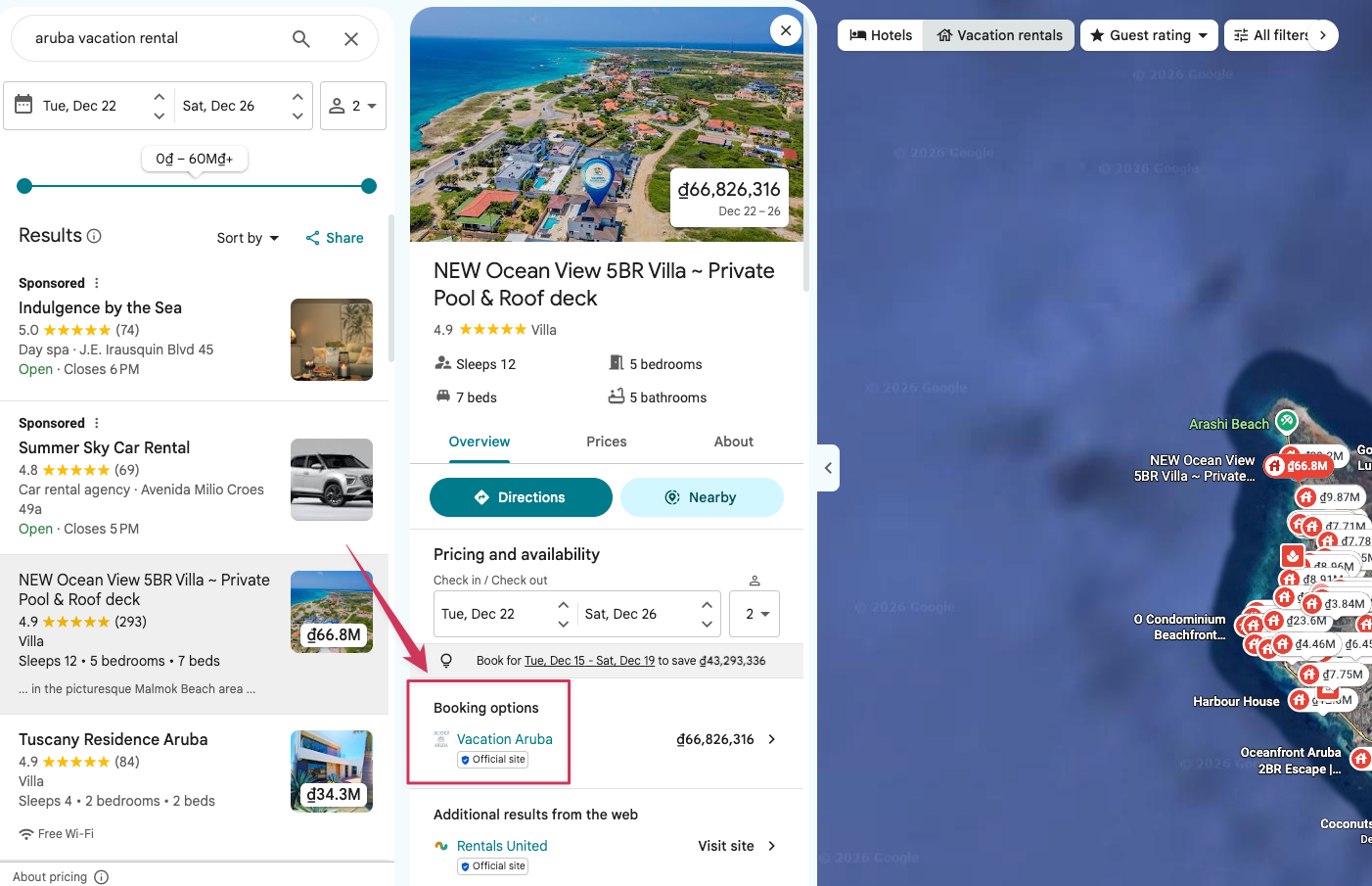
Google Search: Search for your property → Click Website (if available).
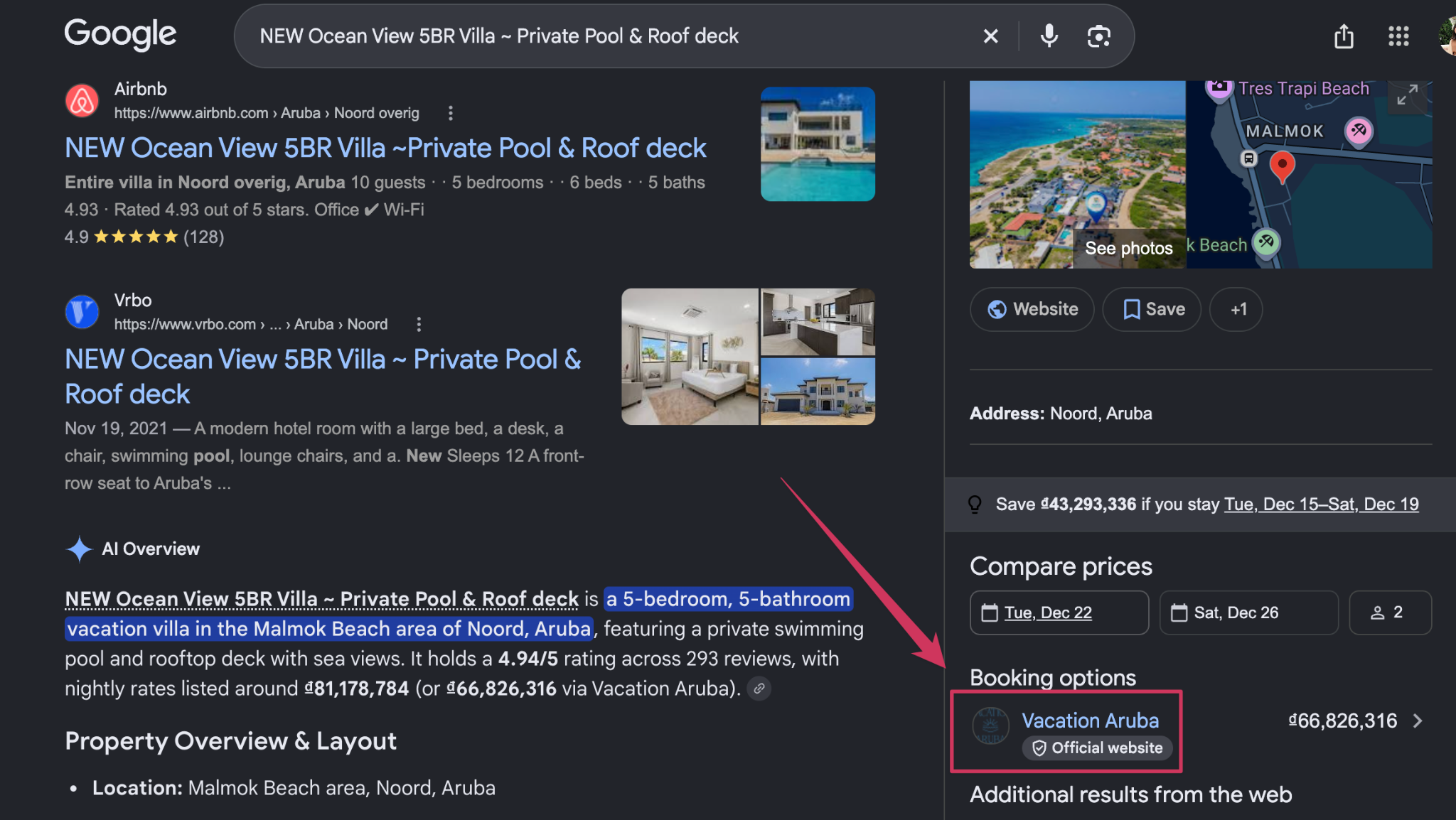
Once guests click the website link, they are redirected to your direct booking website.
Step 2: Complete the Reservation
The guest selects their dates, number of guests and completes the reservation directly on your website (if you do not have a website, GuestWisely will automatically create a booking page for you).
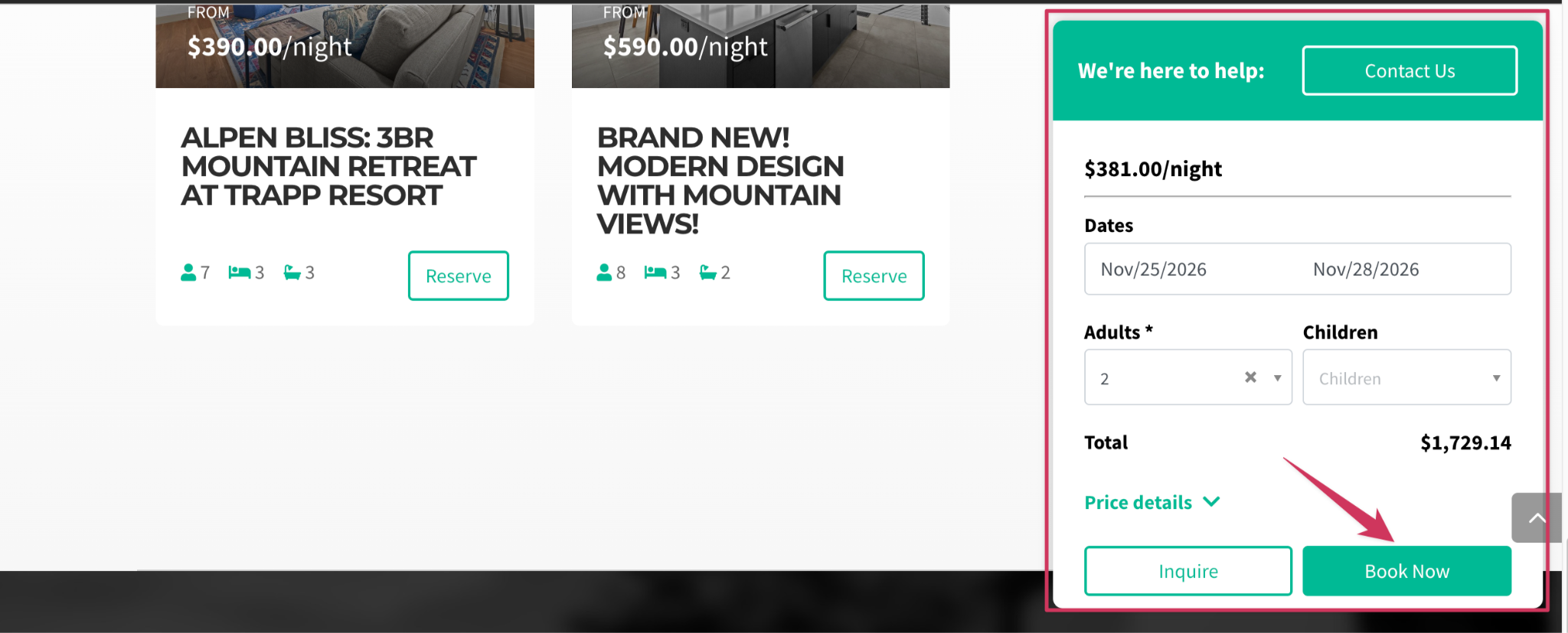
Once the guest completes the booking, the reservation is automatically created in GuestWisely through your direct booking system.
Important: Reservations are not received from Google Travel through the Channel Manager. They are processed through your direct booking website. This means that your website's booking engine must be correctly configured and that rates and availability must remain synchronised.
The link displayed when travelers click Visit site depends on your website configuration:
GuestWisely Website: If you have a website integrated with GuestWisely, the system will use the corresponding property page URL on your GuestWisely website.
Standalone Website: If you use a standalone website integrated with GuestWisely Booking Engine or our WordPress plugin, you need to add the website URL under Link Property Page.
No Website: If no website is configured, the system will automatically use the property's Booking Engine Link.
Managing Reservations
Since guests complete their reservations directly through your website, bookings are managed within GuestWisely as direct reservations.
You can manage all aspects of these reservations through the standard GuestWisely Reservation Manager, including:
Booking details and guest information
Payments
Reservation modifications
Cancellations
Guest communications
Any changes to a reservation should be handled directly in GuestWisely.
Disconnecting a Property from Google Travel
If you no longer wish to advertise a property on Google Travel, you can disconnect it from the integration.
Navigate to Channel Manager > Google Travel
Locate the property you wish to disconnect.
Move it to the left.
Once disconnected, the property will no longer be advertised through Google Travel.
Please note that disconnecting a property from Google Travel does not affect its availability on your own website or other connected booking channels.
Important Things to Remember
Google Travel is a metasearch platform, not a traditional booking channel.
There are no Google booking commissions.
The property can be connected only if the option “hide this property from my website” is deselected. .
Guests complete reservations through your direct booking website.
Rates and availability must be kept up to date.
Google determines which eligible properties are displayed.
Connecting a property does not guarantee immediate publication.
Your direct booking website must be operational and correctly configured.
If you have any questions, reach out to GuestWisely support for assistance.
Was this article helpful?
That’s Great!
Thank you for your feedback
Sorry! We couldn't be helpful
Thank you for your feedback
Feedback sent
We appreciate your effort and will try to fix the article